



- Your cart is empty Browse Shop
From Master Light to Magic: Preparing Your Image for Processing in PixInsight
From Master Light to Magic
Preparing your stacked data for real processing
Introduction
With your stacked master light ready, you’re entering one of the most important stages of the workflow.
This is where your raw stack begins its transformation into a polished astrophotograph — cleaning the data, preserving signal, and preparing for colour calibration.
1️⃣ Open Your Master Light
Open your stacked .xisf or .fits file created by WBPP or your stacking software.
💡 Pro Tip: If you have multiple masters (RGB, Luminance), process them one at a time.
2️⃣ Save Your Project Immediately
Save your project straight away using File → Save Project As.
💡 Save often and duplicate your image after major steps to create safe rollback points.
3️⃣ Inspect and Crop the Frame
Zoom in and check for edge artefacts or registration issues.
- Use Dynamic Crop only where needed
- Keep the crop minimal to preserve field of view
4️⃣ Remove Gradients with GraXpert
Run GraXpert to correct vignetting and gradients.
- Use AI mode with high quality
- Ensure real structures are preserved
5️⃣ Analyse Star Quality
Evaluate your stars before sharpening:
- Extract
CIEL*channel - Open
FWHMEccentricity - Run analysis
- Check results:
- Lower FWHM = sharper stars
- 0.4–0.5 eccentricity = round stars
6️⃣ Create an Accurate PSF
For best sharpening results:
- Use luminance or CIEL*
- Open
DynamicPSF - Select clean, unsaturated stars
- Measure PSF
- Enter manually in BlurXterminator
7️⃣ Run BlurXterminator
- Start around ~0.5 sharpening
- Avoid ringing artefacts
- Keep star profiles natural
8️⃣ Apply NoiseXterminator
Run noise reduction while still linear:
- Use default or ~0.45 strength
- Preserve faint detail
- Improve SNR without over-smoothing
9️⃣ Save Your Work
You should now have:
- Cleaned and cropped frame
- Balanced background
- Measured and sharpened stars
- Reduced noise (linear stage)
You are now ready for colour calibration and enhancement.
✅ Quick Reference
- Open master light
- Save project immediately
- Crop edges carefully
- Remove gradients (GraXpert)
- Measure FWHM & eccentricity
- Create accurate PSF
- Run BlurXterminator
- Apply NoiseXterminator (linear)
- Save again before colour work
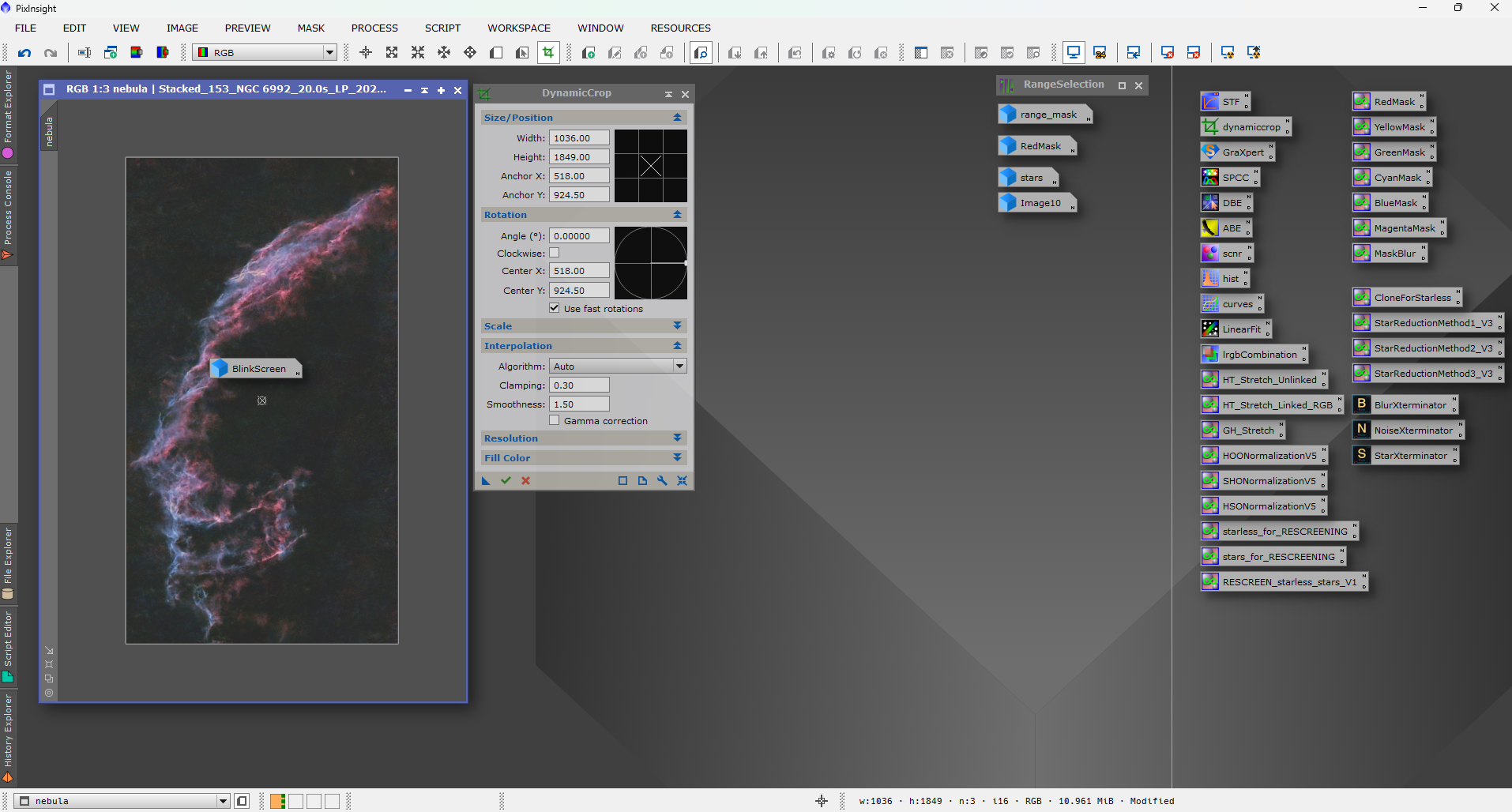
Processed master light transitioning into a refined astrophotography image