



- Your cart is empty Browse Shop
WBPP Made Simple: Stacking Images in PixInsight
WBPP Guide
From raw frames to a clean master light
Introduction
Weighted Batch Preprocessing (WBPP) is PixInsight’s all-in-one script that calibrates, registers, and integrates your subframes into a clean master light.
It may look intimidating at first, but once you understand what to enable, it becomes one of the most powerful tools in your workflow.
🌌 Why WBPP Matters
WBPP automates calibration, alignment, and stacking — the three pillars of deep sky imaging.
Done properly, it preserves faint detail, reduces noise, and ensures accurate colour.
Preparation is everything. Good calibration is half the battle.
1️⃣ Opening WBPP
Go to:
Scripts → Batch Processing → WeightedBatchPreprocessing
📸 WBPP main window
2️⃣ Adding Your Frames
Lights
- Add all light frames
- Group exposures logically
- Exposure tolerance: ~20%
- ✔️ CFA Images (for OSC/DSLR)
Darks
- Match exposure, gain, temperature
- Optimise Darks: OFF (unless mismatched)
Flats
- Match filters and setup
- Include flat-darks or bias
Bias
- Use 50–100 frames or master bias
3️⃣ Calibration Panel
- ✔️ Linear Defects Correction: ON
- ✔️ Subframe Weighting: PSF SNR
- ✔️ Image Registration: ON
- ✔️ Local Normalisation: ON
- ✔️ Image Integration: ON
- ✔️ Astrometric Solution: ON
4️⃣ Post-Calibration Panel
- ✔️ Debayer (OSC/DSLR)
- ✔️ Drizzle: OFF (unless undersampled)
- ✔️ Fast Integration: OFF
5️⃣ Pipeline Panel
- ✔️ All steps active
- ✔️ Generate Rejection Maps
- ✔️ Preserve White Balance: OFF
- ✔️ Detect Masters from Path
6️⃣ Integration Panel
- ✔️ Average combination
- ✔️ Winsorized Sigma Clipping
- ✔️ Large-scale rejection ON
- ✔️ Sigma: 4.0 / 3.0
7️⃣ Running WBPP
- Set output folder
- Run diagnostics
- Click Run
✅ Minimum Setup
- Lights + Darks only
- Optimise Darks if no bias
- Expect reduced quality
🚀 Advanced Setup
- Use full calibration set
- Enable Local Normalisation
- Use Drizzle if undersampled
🛠️ Troubleshooting
Noisy master
- Add more subs (noise ∝ √N)
- Check calibration matches
Blurry stars
- Registration issue
- Remove poor subs
Flats not working
- Check optical match
- Include bias or flat-darks
WBPP crash
- Check logs
- Verify settings
📌 Key Takeaways
- Calibration is everything
- Always inspect subs first
- Darks = minimum, flats + bias = better
- Applies to all stacking software
✅ WBPP Cheat Sheet
Lights
- Add all subs
- CFA enabled if needed
- Weighting: PSF SNR
Calibration
- Defects ON
- Registration ON
- Local Norm ON
Integration
- Average
- Winsorized clipping
- Sigma 4 / 3
Clean calibration = clean masters
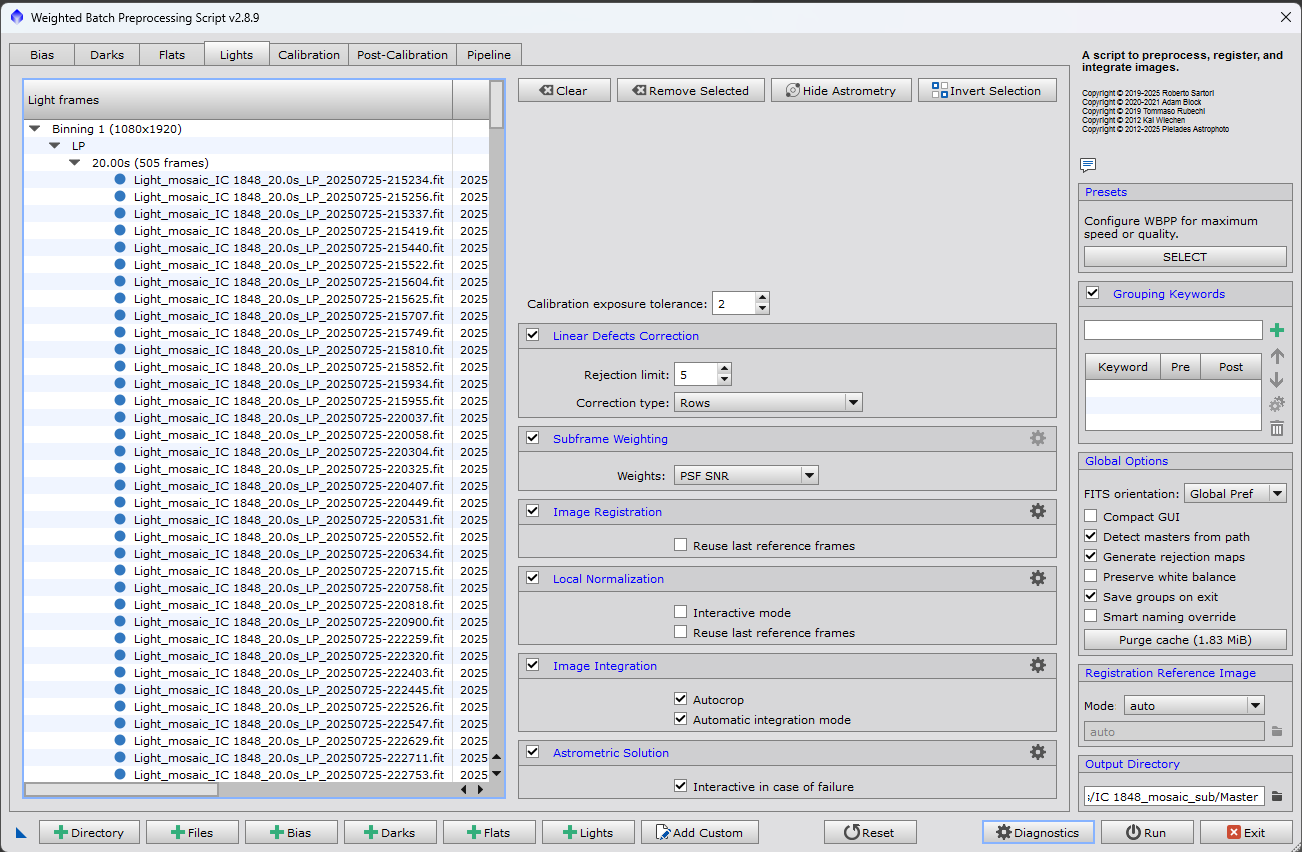
PixInsight WBPP interface showing calibration, registration and integration workflow